A great video sales letter can still fail on a weak page. If the player loads slowly, the headline contradicts the hook or the buy button appears before the viewer knows the price, the best script in the world will underperform. A VSL landing page is the stage your video performs on, and small layout decisions often move conversion as much as rewriting the script.
Most results for VSL landing page examples are galleries of screenshots. Screenshots show what a page looks like, not why it works or how the player is configured. This guide covers the layout that works, 12 VSL landing page examples organised by offer type with the player settings for each, and a free VSL page template you can copy section by section.
What makes a VSL landing page different from a normal sales page
A traditional long-form sales page asks the visitor to read. A video sales page asks them to watch. That changes the priorities:
For practical guidance on VSL vs video ad, read the dedicated guide.
The video is the hero. Everything above the fold exists to get the play.
Less copy above the fold. The headline sets up the video; the video does the selling.
Timing matters. Elements such as the buy button, price and order form often appear only after the video reaches the offer.
The player is part of the design. Controls, progress bar, autoplay and captions all affect retention and conversion.
A video sales page still needs copy below the video for people who prefer to scroll, but the order of persuasion is built around the VSL.
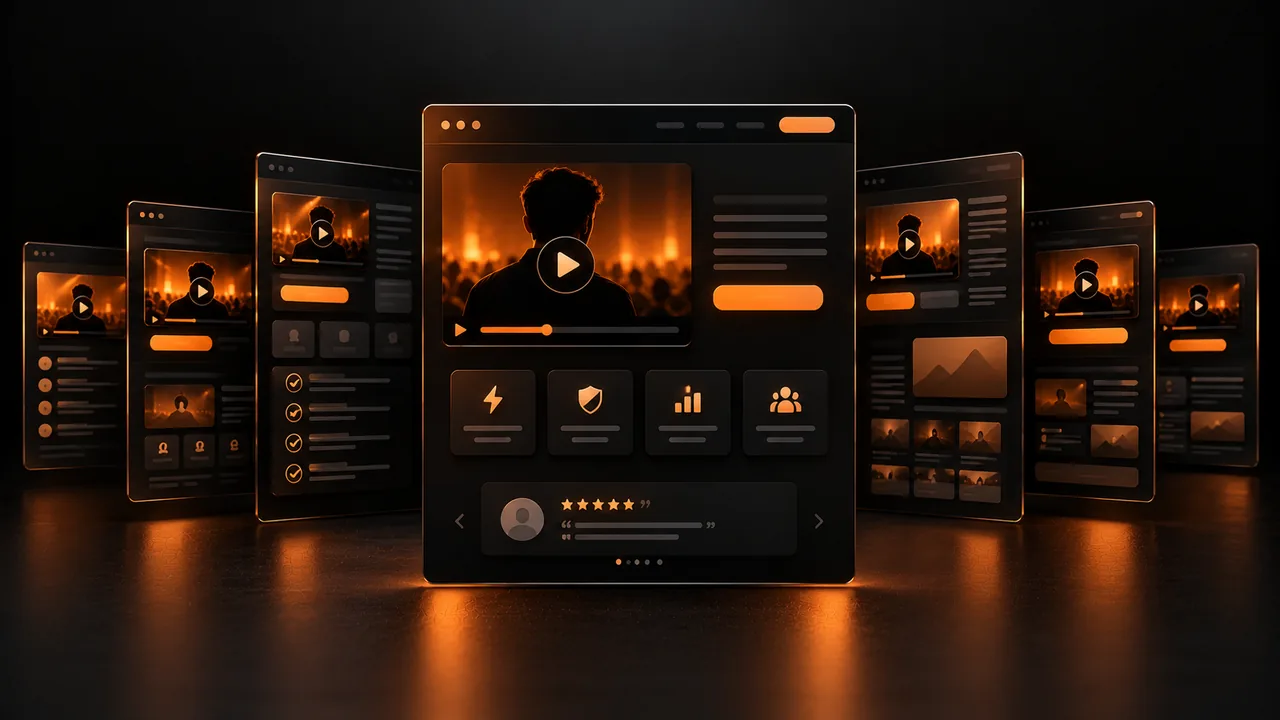
The anatomy of a high-converting VSL landing page
Every effective VSL landing page we review shares the same core layout.
1. Pre-headline and headline
One short line that calls out the audience ("For online coaches who…") and one headline that promises the outcome the video explains. The headline should match the ad or email that sent the visitor and the first sentence of the video.
2. The player, above the fold
On mobile, the player should be visible without scrolling. Use a clean, branded player with no third-party logo and no distracting related videos. Muted smart autoplay with a clear "click to unmute" prompt usually raises play rate compared with a static thumbnail.
Choosing a player? Compare VTurb vs AtomicPlayer.
Explore the custom video player to configure the viewing experience for your funnel.
3. Controls configured for selling
Many VSL owners hide the scrub bar or use a progress bar that moves faster at the start, so viewers feel they are progressing. Others keep standard controls for transparency, especially for higher-priced or B2B offers. Our guide on VSL progress bar and controls explains the trade-offs.
4. Captions on by default
A large share of mobile viewers start videos without sound. Automatic captions keep them watching until they unmute.
5. Timed call to action
Show the buy button when the offer is revealed. Showing it too early distracts; too late loses impatient buyers. A timed CTA inside the player plus a delayed button below the video covers both groups. See video call to action timing.
6. Pitch reveal (optional)
Some pages hide the price, order section or even the full page until the video reaches a set second. AtomicPlayer's Pitch Reveal can hide elements until a chosen timestamp, with an optional countdown.
7. Below-the-video content
Offer summary, what's included, testimonials, guarantee, FAQs and a repeated CTA. This serves scrollers and reassures viewers who already decided.
8. Footer trust signals
Contact details, refund policy, privacy and terms. Payment platforms and ad networks often require these.
12 VSL landing page examples by offer type
These VSL landing page examples are composite patterns drawn from common funnel types. Use them as starting points and test the details on your own traffic.
For practical guidance on video sales funnel, read the dedicated guide.
Example 1: Low-ticket ebook or mini-course
Short video (5–10 minutes), muted autoplay, CTA visible early because the decision is small. Price shown in the video and repeated below.
Example 2: Mid-ticket online course
Video of 15–30 minutes, hidden or accelerated progress bar, CTA timed to the offer reveal, testimonials directly below the player.
Example 3: High-ticket coaching application
Long video, standard controls for trust, no price on the page. The CTA leads to an application form, not a checkout. Use a lead capture gate only if you need to qualify viewers early.
Example 4: Supplement or physical product
Story-led VSL, multiple package options revealed after the pitch, guarantee badge near the order buttons, captions on by default for mobile ad traffic.
Example 5: SaaS free trial
Short demo-style video with chapters, CTA available throughout ("Start free trial"), feature summary and integration logos below.
Example 6: Webinar replay page
Recording presented as an on-demand session with a timed offer section, replay deadline and a resume feature for returning viewers. See our guide on perpetual webinars.
Example 7: Launch or cart-open page
Real deadline countdown, offer bonuses stacked below the video, CTA shown at the offer and repeated at the bottom.
Example 8: Upsell or one-time offer page
Very short video (1–3 minutes), autoplay, single accept/decline choice. Read our full guide to the upsell page video.
Example 9: Local service or agency
Founder-on-camera video explaining the process, booking calendar embedded below, reviews and case studies after the video.
Example 10: Multilingual offer
Same VSL served in the viewer's language with AI dubbing or subtitles, localised headline and currency.
Example 11: Lead magnet video sales page
Short educational video with an email gate at a key moment, then the full training. See video lead capture.
Example 12: Retargeting page for returning viewers
Shorter cut of the main VSL that starts near the offer, "continue watching" badge for repeat visitors and a more prominent CTA.
Player settings cheat sheet for every VSL landing page
Autoplay: muted smart autoplay with unmute prompt for cold traffic.
Controls: minimal for low and mid-ticket; standard for high-ticket and B2B.
Captions: on by default.
CTA: timed to the offer, repeated below the player.
Resume: enable continue watching for long videos.
Branding: your colours and no third-party logo on the player.
Speed: adaptive streaming and a global CDN, especially for mobile ad traffic.
Free VSL page template (copy section by section)
Use this VSL page template as a wireframe. Replace the bracketed text with your own copy.
Pre-headline: "Attention [audience]: [specific situation]"
Headline: "How to [desired outcome] without [main objection] – watch the short video below"
Player: VSL, muted autoplay, captions on, branded skin
Under-player line: "Make sure your sound is on" (mobile only)
Timed CTA: "[Action] – [Price or next step]" appears at the offer second
Offer summary: what's included, bonuses, price, payment options
Social proof: three to six testimonials, ideally with results
Guarantee: terms in plain language
FAQ: five to eight common objections
Final CTA: repeat button and deadline (if real)
Footer: contact, refund policy, privacy, terms
Build this VSL page template in your preferred page builder. If you use Atomicat, the page builder and AtomicPlayer work together, so player settings, timed CTAs and analytics live in one place.
Video sales page vs text sales page: when to use each
A video sales page is not always the right choice. Use this quick guide to decide:
Choose a video sales page when the offer needs a story, a demonstration or a strong personal connection; when traffic is mostly mobile; and when you have a presenter who is credible on camera.
Choose a text-led page when your audience prefers to skim, the offer is simple and well understood, or the buyer is comparing technical details.
Combine both when you sell to mixed audiences. Put the VSL at the top and a well-structured text version below, so viewers and readers each get their preferred format.
Most of the VSL landing page examples above use this hybrid approach. The video carries the persuasion; the text below catches scrollers and answers last-minute questions.
Mobile-first details for every VSL landing page
More and more VSL traffic arrives from mobile ads, so design the VSL landing page for a phone first and a desktop second.
Player width: full width of the screen, with no side margins wasting space.
Headline length: short enough that the player still appears above the fold on a small phone.
Unmute prompt: large and obvious, placed over the video rather than next to it.
Captions: readable size, high contrast and not covered by player controls.
CTA buttons: large tap targets, sticky at the bottom of the screen once the offer is revealed.
Page weight: compress images, remove unnecessary scripts and lazy-load anything below the video so the player loads first.
No early pop-ups: a pop-up in the first seconds covers the video and pushes viewers away.
Run every new VSL page template through a real phone test on a mobile connection before you send paid traffic to it. What looks fine on a desktop preview often hides a slow player or a button that sits under the browser bar.
How to use these VSL landing page examples with your own data
Templates and VSL landing page examples are starting points, not answers. Once your page is live, let your analytics tell you which details matter for your audience:
Check play rate first. If fewer than half of visitors start the video, work on the headline, thumbnail and autoplay before anything else.
Check the first 30 seconds. A steep drop early means the headline and the video opening do not match.
Check pitch retention. If few viewers reach the offer, shorten the middle or reveal the offer earlier.
Check CTA clicks after the offer. If viewers reach the offer but do not click, test CTA timing, wording and offer framing.
This sequence keeps your video sales page improvements focused on the biggest leak first.
How to test your VSL landing page
Once your VSL landing page is live, test one element at a time:
Headline vs alternative headline
Autoplay vs click-to-play
CTA timing (at the offer vs 30 seconds before)
Progress bar visible vs hidden
Pitch reveal on vs off
Measure each test on revenue per play, not just clicks. A change that increases clicks but attracts weaker buyers is not a win.
Common VSL landing page mistakes
A headline that promises something different from the video's opening
Heavy pages that make the player load slowly on mobile
A player with someone else's logo and suggested videos
Buy button visible from second one on a long VSL
No content below the video for scrollers
Fake countdowns that reset on refresh
Frequently asked questions
Should the price appear on a VSL landing page before the video ends?
For most offers, reveal the price in the video at the offer and show the buy button at the same time. For low-ticket offers, showing the price earlier can work. For high-ticket offers, the page often leads to an application or call instead of a visible price.
How long should the copy below the video be on a video sales page?
Long enough to answer the questions that stop a ready buyer: what is included, price, guarantee and common objections. Many pages use a short offer summary plus FAQs. Treat it as support for the video, not a full second sales letter.
Do I need a different VSL page template for mobile?
You can use the same template, but check it on mobile first. Make sure the player is above the fold, captions are on, the CTA is easy to tap and nothing pops up over the video during the first seconds.
Can I use a free VSL page template on any page builder?
Yes. The template is a structure, not code, so it works in WordPress, ClickFunnels, Kajabi, Webflow, Framer or custom HTML. Embed your player, then build the sections around it in the order listed.
Which VSL landing page examples work best for cold ad traffic?
Pages with a strong headline that matches the ad, muted autoplay, captions on and a tight opening usually perform best for cold traffic. Cold visitors need the story, so avoid hiding the video below long copy.
If you read nothing else
- For most offers, reveal the price in the video at the offer and show the buy button at the same time. For low-ticket offers, showing the price earlier can work. For high-ticket offers, the page often leads to an application or call instead of a visible price.
- Long enough to answer the questions that stop a ready buyer: what is included, price, guarantee and common objections. Many pages use a short offer summary plus FAQs. Treat it as support for the video, not a full second sales letter.
- You can use the same template, but check it on mobile first. Make sure the player is above the fold, captions are on, the CTA is easy to tap and nothing pops up over the video during the first seconds.
- Yes. The template is a structure, not code, so it works in WordPress, ClickFunnels, Kajabi, Webflow, Framer or custom HTML. Embed your player, then build the sections around it in the order listed.
Atomicat Team
The team behind AtomicPlayer — writing about video conversion, retention, and the infrastructure that makes both measurable.